Wednesday, April 23, 2008

WebLogic Portal: Exposing Portlets (JSR 168, WSRP, JSF, Struts, etc) as Enterprise Google Gadgets

Wondering how to expose Google Gadgets from WebLogic Portal? As promised, this is the second entry in a two part series talking about Google Gadgets. The first entry explained how to build a simple gadget. Now we will explore how to surface a Java portlet as a gadget using WebLogic Portal. Exposing a Google Gadget from any WLP portlet type (JSR 168, WSRP, JSP, Pageflow, JSF, Web Clip, etc) requires no coding - just a simple XML configuration file. This blog entry will show you exactly how to do it.

NOTE: this blog entry was originally posted April 23rd, 2008 on my previous blogging system (dev2dev.bea.com).

History of the Integration

As I mentioned in the first posting we have been doing demos of WLP portlets as Google Gadgets for a long time - since the second half of 2006 with our WLP 9.2 release. This was all possible because of a feature introduced in that release called Portlet Publishing. Portlet Publishing allows any WLP hosted portlet to be exposed as a URL. If you understand the basics of Google Gadgets, you can hopefully see how this feature can be used to turn any portlet into a gadget simply by referencing that portlet's URL in the gadget descriptor.

Early demos used a servlet to dynamically generate the appropriate Google Gadget descriptor on the fly. We even experimented with clever hacks to enable Single Sign On between iGoogle and WLP. We worked with the Google Gadget engineering team to explore ideas in this area.

But in the end we decided not to productize the integration. This is due in large part because authoring the Google Gadget descriptor for a portlet is quite easy, and therefore an official feature wouldn't add tremendous value. Additionally, we were concerned about the supportability of such a feature, for example what would happen if the descriptor format changed. Also, the explorations around authentication were not enterprise quality approaches, and so not something we wanted to promote.

Therefore, at this time WLP does not offer a "Generate Google Gadget..." option in the IDE, or provide any other specific feature. However, as this blog entry will show, using the FULLY supported feature of Portlet Publishing, you can expose your portlets as gadgets with NO CODING required.

Portlet Publishing

Before we can talk about generating a Google Gadget, we need to take a look at Portlet Publishing. Once again, this feature exposes any WLP hosted portlet as a URL - an HTTP addressable end-point. The power of this feature is that any thing that can consume an HTTP end-point (e.g., an IFrame within any webpage) can be host to a WLP portlet. It is important to note that Portlet Publishing works for all WLP portlet types, like JSR 168, WSRP, JSF, Struts, Web Clipper, etc.

This means that with a single deployment of your portlet on WLP, it can be used over the following channels simultaneously:

  • Directly embedded in a standard WLP portal/desktop
  • Directly embedded in any JSP hosted on the WLP server (see the portalFacet JSP tag)
  • Federated to external WSRP consumers (WSRP is a web services standard for consuming remote portlets)
  • Federated to any consumer of HTTP, notably browsers via IFrames and XmlHttpRequests (which means ANY website on the planet)

image

In WLP 9.2 and WLP 10, Portlet Publishing was limited to the library instances of portlets. This meant user preferences were not supported through the HTTP channel. However, with WLP 10.2, Portlet Publishing has been augmented to allow for Desktop Instances (and thus user preferences) to be exposed over the HTTP channel. Consult the documentation for more details on this point.

To consume portlets published over the HTTP channel in any web page, you can inject the portlet into the HTML using one of these techniques:

  • An inline frame (iframe) that points to the URL to the portlet
  • DOM Injection - using simple JavaScript that WLP provides, you can dynamically inject the portlet into the page using Ajax (XmlHttpRequest)

Once again, consult the documentation for more details on these points.

Exposing your WLP Portlet as a Google Gadget

You have hopefully read my previous blog entry on how to build a simple Google Gadget. This section builds on that knowledge. Essentially, we will author a Google Gadget descriptor that points at a WLP portlet exposed over HTTP (via Portlet Publishing).

To make this entry as simple as possible, we will use the library definition form of the Portlet Publishing URL. For example, assume you have a portlet that is exposed at this URL:

http://wlp.bea.com/dvt/portlets/wlp/stackWLP.portlet

If you are unfamiliar with WLP, the .portlet file is a file based XML document that describes a portlet's meta data. In this case, it has been deployed in the portlets/wlp directory of the dvt webapp. When directly addressed, Portlet Publishing kicks in and serves up the portlet implementation associated with this .portlet file (this is the library definition approach to publishing).

You can now easily author a gadget descriptor that targets that URL, and thus exposes that portlet as a Google Gadget:

<?xml version="1.0" encoding="UTF-8" ?>

  <Module>

<ModulePrefs

title="WLP Portlet Gadget"

height="120"

author="Peter Laird"

  />

  <Content href="http://wlp.bea.com/dvt/portlets/wlp/stackWLP.portlet" type="url" />

</Module>

Copy this gadget descriptor to a public web server, and then add this gadget to your iGoogle portal as I showed in my previous post. And Presto!

The Fine Print

Some details to think about:

Titlebars: WLP will by default render a titlebar to the portlet, and so will iGoogle. To avoid nested titlebars, use the "light" decoration option with Portlet Publishing desktop portlet instances.

Authentication: if you have a cookie based web SSO solution in place, your users will automatically be logged into the WLP server even when the user navigates to iGoogle (by virtue of how iframes work). In other circumstances, you will need to provide a login screen within the portlet.

image Add to Google button: it is often nice to have an "Add to Google" button on the portlet. This is easily done by just copying the URL pattern seen on other sites that provide such a button. You will essentially need to embed the URL to your gadget descriptor into the button link.

Preferences: you will need to decide what to do with preferences. WLP manages preferences on the server side. If your portlet is exposed over multiple channels, stick with that. However, if the portlet will ONLY be consumed as a Google Gadget, you may consider using the Google provided preference service.

JavaScript Libraries: Google provides a number of JavaScript libraries for Gadget developers. When developing a portlet that will only be exposed as a gadget, feel free to use these. However, if the portlet will be exposed over multiple channels (like on a WLP desktop), be aware that none of the Google libraries have been certified within WLP.

References


Tuesday, April 22, 2008

Introduction to Google Gadgets

We have been showing how to expose WebLogic Portal portlets as Google Gadgets for almost two years now. Embarrassingly enough, we haven't written any blogs or articles on HOW to do it. We have answered email questions about it, but nothing public. This two part blog series will correct that omission. You will hopefully see that it is really quite simple to do. This first entry will talk about building a generic Google Gadget (without WLP), and then the following entry will show how to convert any WLP portlet into a gadget.

NOTE: this blog entry was originally posted April 22nd, 2008 on my previous blogging system (dev2dev.bea.com).

What are Google Gadgets, and iGoogle, please?

Google Gadgets are web based widgets/portlets/[insert your favorite web component term here] that are based on technology provided by Google specifically to make federating gadgets easy. To see gadgets in action, the best place to try them out is on the iGoogle portal.

Gadgets can really do anything. This example shows an eBay integrated gadget that allows a user to interact with their eBay account within the gadget:

image

The technology provided by Google can be lumped into these buckets

  • An xml file format for describing a gadget (called the descriptor)
  • A gadget preferences model - for storing user specific preferences for a gadget external to the gadget implementation
  • Various JavaScript libraries for doing useful things
  • An online directory of pre-built gadgets
  • iGoogle - the reference platform for users to use gadgets
  • Google Gadgets for your Webpage - a JavaScript mechanism for including a gadget on ANY web page

Several things are notably missing from what Google provides with regard to gadgets

  • Gadget hosting - aside from a few official Google gadgets, all the gadgets are hosted independently by their creators
  • Gadget validation - treat every gadget with suspicion; even though it is flying the colors of a well known brand it may be hosted by a guy in a basement.
  • Authentication - there is no provided mechanism for gadgets to inherit authentication from the consuming page, notably no single sign on with iGoogle

Finally, note that there is another gadget technology offered by Google called Desktop Gadgets. There gadgets are targeted toward Google Desktop, and aren't related to the gadgets we are discussing.

The Google Gadget Phenomenon - why should you even care?

Google Gadgets and iGoogle were the fastest growing product offered by Google in 2006 and had strong growth again in 2007

“The star performer for [2007] was Google’s personalized start page service iGoogle which increased traffic in the 12 months to November by 267.64%.” (TechCrunch)

Useful Gadgets get heavily used:

“The Google gadget ecosystem received 960 million pageviews last week” (Niall Kennedy)

These metrics are largely based on use of gadgets and iGoogle in the consumer space. But consider how your enterprise can benefit from deploying Google Gadgets:

  • A new channel to your customers within iGoogle
  • Offered as a widget to your customers to place on their own web pages
  • A new channel to your partners/employees within iGoogle

Building a Simple Google Gadget - as easy as falling off a bike?

This section discusses the express route to building a gadget. Steps to build:

  1. Create a gadget implementation, which is nothing more than an HTML document served from a public web server.
  2. Create a gadget XML descriptor, that refers to the gadget implementation.
  3. Add the gadget to iGoogle.

Step 1: Create the Gadget Implementation

Save this HTML into a file on a public web server.

<html>

<body>

Hello World.

</body>

</html>

Step 2: Create the Gadget Descriptor

Save this XML into a file on a public web server (I have also hosted one publicly here for now: http://wlp.bea.com/blogs/simplestGadget.xml). You will need to update the href included in the body to the URL to your HTML document created by step 1.

<?xml version="1.0" encoding="UTF-8" ?>

<Module>

<ModulePrefs

title="Simplest Gadget"

directory_title="Simplest Gadget"

title_url="http://wlp.bea.com"

description="Very very simple gadget."

height="120"

author="Peter Laird"

/>

<Content href="http://wlp.bea.com/blogs/simplest.html" type="url" />

</Module>

Step 3: Add the gadget to iGoogle

Login to iGoogle, and then click the Add Stuff link, and then Add Feed or Gadget link. Provide the URL to the XML document created in step 2.

image

Step 4: Enjoy!

image 

Next Steps

In the next blog post, I will show how to expose any WLP portlet as a Google Gadget. Stay tuned!

References

I only covered a small part of the Google Gadget technology. Their developer documentation is excellent, so please refer to it for more details:

Technorati Tags: ,

Monday, December 17, 2007

Deploying the ALBPM Workspace into WebLogic Portal

Customers that purchase both WebLogic Portal (WLP) and AquaLogic Business Process Management (ALBPM) will certainly want them to work together. Specifically, customers want to be able to deploy the ALBPM Workspace user interface as portlets on a WLP portal. This blog explains how to do that, and provides a script to help automate the most tedious steps.

NOTE: this blog entry was originally posted December 17th, 2007 on my previous blogging system (dev2dev.bea.com).

Use Case

The ALBPM Workspace contains a total of 4 portlets. By default, they deploy in their own pre-built web application. But if you have both ALBPM and WLP in your environment, it would be useful to be able to deploy the portlets into WLP.

The four portlets are:

  • Actions Menu: lists the operations the user can perform, like create a new process
  • Views Menu: lists the various views available, like process inbox and bookmarks
  • Worklist: displays the list as directed by the Views menu, like the list of active processes
  • Instance Detail: shows the details of a specific process

A view of the completed Workspace on WLP:

albpmOnWLP

Integration Implementation

Behind the scenes, there are some challenges to this project. First, when the user authenticates with WLP, they shouldn't have to also sign into ALBPM. Fortunately, ALBPM implemented an SSO mechanism in ALBPM 6.0. This can be enabled via a couple of checkboxes during the configuration of ALBPM (more on this later).

Second, the portlets and all supporting file based artifacts need to be brought into the WLP Web Project. While most of this is straightforward, it is an error prone operation. Also, merging in the necessary web.xml entries for the ALBPM workspace into the stock WLP web.xml is tricky. A simple error can create headaches. This part screams for an automated solution.

To make this integration as easy as possible, I have created a distribution that contains movies and an Ant script. The movies will to help guide you through the process. The Ant script removes a lot of tedious steps from the process.

Note: while this integration guide and script are deemed reliable, they are not officially supported. The official documentation is the supported source of information on this integration.

ALBPM 6.0 Workspace for WLP 10

There is official documentation to explain how to integrate the products. But sometimes seeing the integration is the best teacher. Therefore, the distribution that I have created includes a series of movies. Additionally, it contains an overview presentation on the process of integrating the products. Finally, the actual deployment of the ALBPM Workspace onto WLP is scripted via an Ant script that I provide.

I have hosted the files of the distribution in this location:

ALBPM 6.0 Workspace for WLP 10 Download Center

Note: to view the Flash FLV movies you will need an FLV player, such as the free FLVPlayer

ALBPM_for_WLP_slides.zip and ALBPM_for_WLP_slides_movie.zip

Start with these. One zip contains the Powerpoint presentation, the other contains a movie of me talking through the slides. This deck explains what the integration is all about, and the high level steps needed to perform the integration.

ALBPM_for_WLP_movie1.zip, ALBPM_for_WLP_movie2.zip, ALBPM_for_WLP_movie3.zip

These zip files contain detailed walk throughs of various parts of the integration. View these movies in order, and use the Pause button so you can follow along while you perform the integration on your machine.

ALBPM_for_WLP_script.zip

This zip contains the Ant script and associated files that will automate the ALBPM Workspace deployment into WLP. This script does a ton of file copying and also includes some new files (.portlets) to make this a smooth process. While you can do all of this by hand, the script gets the job done quickly and correctly.

Acknowledgements

I didn't complete this project by myself. The ALBPM Development and QA teams (Eduardo, Nico, Mariana, Alex, Mariano, and others) did a lot of work on sorting out the process to get the products integrated. Additionally, some folks from BEA Professional Services (Paddy in particular) helped get this going. THANKS!

Additional Resources

Need more information? Here are some good links to get you started:

  • WLP Download - download WebLogic Portal (minimum version 10.0)
  • ALBPM Download - download AquaLogic BPM (minimum version 6.0 MP1)
  • ALBPM for WLP Official Documentation - official docs for integrating the products
  • Alex Toussaint's Blog - ALBPM product manager's blog
  • Jesper Joergensen's Blog - ALBPM product marketing blog
  • Josh Lannin's Blog - WLP products manager's blog, check out the 5 part WLP futures series
Add to Technorati Favorites
Technorati Tags: ,

Comments from the original blog:
  • Hi Praveen -

    Yes, something with the Apache config is doing strange things with that. We just did a lot of Apache work to speed up the WLP demos, and I am nervous to touch it to sort out the issue. I have found that Firefox, not IE, should be able to download the files fine. Can you try that?

    PJL

    Posted by: plaird on May 5, 2008 at 11:16 AM

  • Peter, thanks a lot. It seems like a very useful information but I am not able to download using the hyperlinks. Can you pls help me in getting these? my emailID: awasthypr@saic.com Thanks again!!

    Posted by: praveenawasthy on May 5, 2008 at 2:15 AM

  • ALBPM 6.0 MP2 Update

    I produced the script and movies against ALBPM 6.0 MP1. However, I tested against 6.0 MP2 with success (with one caveat).

    The only issue is that there are some JSPs in the ALBPM MP2 workspace that cause the Workshop IDE (WLW) to report build failures (about 45). You will need to disable JSP validation for the WLP web project to get around this.

    Project Properties->Validation->uncheck the JSP validator

    I have updated the presentation to include this GOTCHA, and will also work with the ALBPM team to discover the root cause.

    Thank you Neville for reporting the issue.

    PJL

    Posted by: plaird on January 8, 2008 at 9:31 AM

  • Kunai -

    Sorry about that, I was using an 3rd party file share to host the files. I have rehosted the files on our WLP demo server at wlp.bea.com. I updated the link in the blog too.

    Thanks for the note!

    Posted by: plaird on January 3, 2008 at 11:35 AM

  • Peter, I'm about to get started on deploying ALBPM Workspace on WLP and I would've loved to have downloaded your slides, movies on the subject. However, it appears that the hyperlinks for these downloads have been disabled. Is there any other way we can exchange this information? Please feel free to send an email at "kunal.r.shah@citi.com" Regards, Kunal R Shah

    Posted by: kunalrshah on January 3, 2008 at 11:07 AM

Thursday, October 18, 2007

AquaLogic Commerce Services 5.1 for BEA Workshop 9.2

BEA released AquaLogic Commerce Services this year to help BEA customers with their commerce initatives. ALCS is a product that offers a storefront and comprehensive merchandising capabilities out of the box. If you need to build a commerce solution for your business, ALCS makes it quick and easy. This blog entry describes a supplemental distribution that allows BEA Workshop developers to get up and running easily on ALCS.

NOTE: this blog entry was originally posted October 18th, 2007 on my previous blogging system (dev2dev.bea.com).

NOTE: as of 2009, the ALCS product has been discontinued.

AquaLogic Commerce Services

This blog entry will not focus on the ALCS product itself, but if you have not seen it here is a quick overview. It is a full solution for developing commerce projects for the enterprise. ALCS provides a fully customizable commerce solution that offers many features for both developers and merchandisers.

Features at a Glance

  • Complete storefront delivered in the box - a powerful web shopping experience
  • Merchant Tools - catalog management, promotion management, analytics
  • CSR Tools - order management, fulfillment
  • SEO - world class SEO capabilities to drive customers to your door step
  • Ajax one page checkout - fast track your customers through the checkout process
  • Developer friendly - productive development experience based on Velocity and Spring MVC technologies
  • Extensibility - highly customizable and extensible architecture offers complete control over the solution
  • SOA foundation - features exposed via web services, and integrated into the BEA SOA story
  • Scalability - built on enterprise Java technology, ALCS can scale to meet the demands of the largest commerce projects

For more detailed information on the features in the product, please check out the product information page.

Introducing ALCS 5.1 for WLW 9.2

One of the benefits of ALCS for BEA customers is that it deploys to WebLogic Server and integrates with WebLogic Portal. It fits in with the products that you already know and love. This makes deployment consistent with other projects you have deployed on the WebLogic stack.

However, for the ALCS 5.1 release the development environment out of the box is not aligned with the BEA Workshop IDE. This will get sorted out for the next release of ALCS. Until then, I have created a supplemental solution for ALCS 5.1 that allows for easy integration with BEA Workshop 9.2.

Called ALCS 5.1 for WLW 9.2, the supplemental download has the following features:

  • Script target to reprovision the ALCS sample application into the Workshop project structure (aka WTP)
  • Script target to reskin the sample store from "Snap it Up" to "Avitek Digital" (credit to Dan Tortorici!)
  • Script target to add in prominent disclaimer/promotion announcements to the store

The download available on dev2dev CodeShare includes ample instructions and a presentation that provides more context.

 DOWNLOAD ALCS 5.1 for WLW 9.2

Additional Resources

To get started with ALCS, also consult the following documentation:

Tuesday, September 25, 2007

WebLogic Security: Configuring the Database Authentication Providers (SQL, Custom, DBMS)

I have gotten a lot of WebLogic security related questions offline as a result of my last blog post. A couple of people have asked for more details behind the WebLogic SQL Authenticator (a database authentication provider) that I mentioned. This blog entry will give deep background into your options when it comes to authenticating users from a database repository. I will finish by explaining how to configure the SQL Authenticator.

NOTE: this blog entry was originally posted September 25th, 2007 on my previous blogging system (dev2dev.bea.com).

First, a bit of terminology. When looking in the WebLogic Server documentation for a database authentication provider you will find at least a few names:

We all love choice, but what's up with all these names? Are they all the same thing, or does WLS provide multiple provider implementations?

In short, WebLogic does provide multiple database authentication provider implementations. This blog entry will sort out specifically what providers are available to you when authenticating from a database. We will look inside the WebLogic providers to understand what features are supported by which provider. After we have that covered, I will describe how to configure a SQL Authenticator provider in the WLS Console and how to provision the database.

Peter's Best Practice: Use a Database Backed Authentication Provider!

Before we dive into the details, I want to take a moment to congratulate you on reading more about this topic. I have worked at BEA many years, and I have been involved in many customer production escalations. When it comes to Authentication repositories, my experience tells me that you are safest performance-wise with a database backed authentication store. While customers have certainly been successful with other types of authentication repositories, if you want to minimize risk the database approach trumps all others. A database backed repository has few moving parts, and the query necessary to authenticate a user is a simple SELECT. So if you want my opinion, I say go with a database when you have the option.

The Official Flavors of WebLogic Database Authentication Providers

Back to the topic at hand - what are the WebLogic database authentication providers? The official documentation source, edocs.bea.com, will get us started. The docs explain what is provided for you:

Weblogic Security Providers

A set of Database Management System (DBMS) authentication providers that access user, password, group, and group membership information stored in databases for authentication purposes. Optionally, WebLogic Server can be used to manage the user, password, group, and group membership information. The DBMS Authentication providers are the upgrade path from the RDBMS security realm. The following DBMS Authentication providers are available:

  • SQL Authentication provider - A manageable authentication provider that supports the listing and editing of user, password, group, and group membership information.
  • Read-only SQL Authentication provider - An authentication provider that supports authentication of users in a database and the listing of the contents of the database through the WebLogic Server Administration Console. The authentication provider requires a specific set of SQL statements so it might not meet all customer needs.
  • Custom DBMS Authentication provider - A run-time authentication provider that only supports authentication. This provider require customer-written code that handles querying the database to obtain authentication information.This authentication provider is a flexible alternative that allows customer to adapt a DBMS Authentication provider to meet their special database needs.

The documentation is reflected by the WebLogic Console, which provides the following dropdown of authentication providers to choose from. Notice that the three database authentication provider types appear.

sqlatn_AtnChooser

While the above descriptions provide some information about the difference between these providers, we can do better. Because you are a developer, you probably want the inside story. Today is your lucky day!

Inside the WebLogic Database Authentication Providers

To get the inside story let's head straight for the source - the authentication provider configuration files. You will find them here:

  • BEA_HOME/WL_HOME/server/lib/mbeantypes/cssWlSecurityProviders.jar

If you open up this JAR, you will find 4 files of interest: DBMSAuthenticator.xml, CustomDBMSAuthenticator.xml, ReadOnlySQLAuthenticator.xml, and SQLAuthenticator.xml. Three of those map directly to the official authentication provider implementations, so those are obviously their configuration files. The fourth, DBMSAuthenticator - what is that? If you look into the XML files, you find that DBMSAuthenticator is the base class for the rest of the providers. By looking at the Extends attribute on the MBeanType element, you can derive the class hieararchy of the providers, shown below.

sqlatn_Classes

Now that you understand how the providers are related, how do you know which one you want? WLS/CSS authentication providers have two components - the JAAS code that actually performs the authentication at runtime, and then a set of management "mbeans" that the provider chooses to implement. Every management feature that a provider can support is surfaced as an mbean interface. The key to understanding what a provider can do for you is to look at the mbean interfaces that it implements. Each interface is optional, meaning a provider may choose what features it can support.

Here is the list of mbeans for authentication providers which provide the manageability around users and groups:

SSPI MBean Quick Reference

Mapping out our providers into a table and the mbeans they implement shows the vast difference in manageability. You will want to select a provider based on your requirements for managing users and groups from WLS.

image

Using the CustomDBMSAuthenticator

This provider is obviously not for use in situations when manageability from WLS is important. It offers no management support. What it does offer is a lowest common denominator approach to integrating a database user repository. Employ this provider when you need to surface just authentication capabilities to WLS, and nothing else. You simply need to implement a plugin that answers the most basic of questions.

Configuring the SQL Authenticator

You are more likely to be using the Read-only SQL Authentication provider or the most powerful SQL Authentication provider. These providers give you manageability from the WLS Console (and WLP Console if using WLP). They are easy to instantiate - the UI surfaces the options you need to configure. I won't go into all the options, but it is important to see that you can change the SQL for each operation if you have a custom schema. The SQL for these providers is designed to be modified to allow you to retrofit a custom database schema. But you can also use the default schema if you are provisioning a brand new user repository (see below for the schema).

sqlatn_ConfigSQLAtn

After configuring the provider, any deltas versus the defaults will be persisted into config.xml. You can see below, I updated the Datasource of course (this is required) but I also made an arbitrary change to the Create Group SQL. See how it wrote the update into config.xml.

<sec:authentication-provider xsi:type="wls:sql-authenticatorType">
<sec:control-flag>
SUFFICIENT
</sec:control-flag>
<wls:enable-group-membership-lookup-hierarchy-caching>
false
</wls:enable-group-membership-lookup-hierarchy-caching>
<wls:data-source-name>
p13nDataSource
</wls:data-source-name>
<wls:sql-create-group>
INSERT INTO GROUPS VALUES ( 'arbitrary change' , ? )
</wls:sql-create-group>
</sec:authentication-provider>


The Default Schema DDL for the SQL Authenticator


You can define whatever schema you want to store users and groups when using the SQL Authenticators. But if you are starting fresh, why not just use the default schema and the default settings on the provider. I would highly recommend this approach.


It doesn't look like we officially document the default database schema so let me show you what it is. I list the Oracle DDL below, but you can find the official DDL for your database vendor in the following location in the WLS 10 install (and a similar location for other versions):


  • BEA_HOME/wlserver_10.0/common/p13n/db/DB_VENDOR/p13n9_create_tables.sql


CREATE TABLE USERS (
U_NAME VARCHAR(200) NOT NULL,
U_PASSWORD VARCHAR(50) NOT NULL,
U_DESCRIPTION VARCHAR(1000))
;
ALTER TABLE USERS
ADD CONSTRAINT PK_USERS
PRIMARY KEY (U_NAME)
;
CREATE TABLE GROUPS (
G_NAME VARCHAR(200) NOT NULL,
G_DESCRIPTION VARCHAR(1000) NULL)
;
ALTER TABLE GROUPS
ADD CONSTRAINT PK_GROUPS
PRIMARY KEY (G_NAME)
;
CREATE TABLE GROUPMEMBERS (
G_NAME VARCHAR(200) NOT NULL,
G_MEMBER VARCHAR(200) NOT NULL)
;
ALTER TABLE GROUPMEMBERS
ADD CONSTRAINT PK_GROUPMEMS
PRIMARY KEY (
G_NAME,
G_MEMBER
)
;
ALTER TABLE GROUPMEMBERS
ADD CONSTRAINT FK1_GROUPMEMBERS
FOREIGN KEY ( G_NAME )
REFERENCES GROUPS (G_NAME)
ON DELETE CASCADE
;


A Few Details for WebLogic Portal Customers


This thread got started because I was discussing in my last blog how WLP 9.2+ by default uses the WebLogic SQL Authenticator. You can, of course, add more authentication providers and remove the SQL Authenticator if you like. When installing WLP, the installer (or you can use the createdb script) will lay down the default SQL Authenticator schema into the WLP schema. Therefore, by default, WLP uses just a single schema for both authentication and Portal operations. This is the most convenient option, but you can change this by switching out the configured datasource.


More Information


For further reading, I suggest these links:


Add to Technorati Favorites


Comments from the original blog:


  • Great article! I was able to successfully help my client configure one for their needs. Thanks again.


    Posted by: sghattu on November 11, 2007 at 6:57 PM


  • I just got a question offline that I will record here - the developer was having trouble creating an Ant build script for building a custom Atn provider.


    My answer:


    When building providers, I have always used the Sample SSPI download from dev2dev CodeShare. It contains a working build script so all of this is taken care of for you.


    SSPI Code Sample


    Posted by: plaird on October 19, 2007 at 10:21 AM


  • Hi Peter, Interesting post but I would like to get more details on your SQLAuthenticator console configuration screenshot. Could you provide me more details on the DataSource name you use. I'm running into troubles with that part! I've tried to provide a configured JDBC data source name but this does not work as the DS is not yet initialized when the security is initialized (not able to start the console anymore). I've tried to provide a Data Source Factory name also without any success!! (Can start the console, but error in the log saying: Connection Pool not usable) Any idea? I'm using Oracle 10g thin jdbc driver and WebLogic server 9.2 Thanks in advance Daniel


    Posted by: ni2corp on September 25, 2007 at 11:43 PM


Saturday, September 22, 2007

Discussion on WebLogic Security: Authentication Providers, Internal LDAP, JAAS, WebLogic Portal, Profile

This blog entry comes from an email thread I had with a fellow BEA colleague. We traded a number of emails - he asked a lot of great questions about how WebLogic Portal (WLP) supports various security features. Since WLP relies heavily on WebLogic Server for those features, my answers apply to WebLogic in general and not just Portal. I am posting the email thread here because I think that this discussion might be of interest to others.

NOTE: this blog entry was originally posted September 22nd, 2007 on my previous blogging system (dev2dev.bea.com).

Before I show the thread, I should provide a glossary of abbreviations and concepts:

  • WLS: WebLogic Server, the J2EE application server that most people associate with the name "WebLogic"
  • WLP: WebLogic Portal, the J2EE portal product built on top of WLS
  • CSS: in this context, not cascading style sheets. Common Security Service is the componentized security package that WLS uses for security.
  • SSPI: the pluggable security subsystem provided by CSS to WLS
  • ATN: authentication, which refers to the process of verifying who a user is (with a password perhaps)
  • ATZ: authorization, which refers to the process of deciding whether the authenticated user has the privilege to perform a certain action
  • UUP: a WLP feature that aggregates profile information for a user from a variety of backend sources using a plugin architecture
  • Internal LDAP: an LDAP repository embedded in CSS historically used for some default SSPI providers

Discussion Thread

From: Colleague

Quick follow-up to our discussion in the hall at BEAWorld, you said that WLP wants to stop using the internal LDAP server altogether and use the database instead. I forgot, though, did you say that had already happened in a previous release, or is that slated for the next release?

From: PJL

Yes and no.

For ATN, WLP does not use internal LDAP. WLP switched to the WLS/CSS provided SQLAuthenticator in WLP 9.2. This does not mean that customers must use it, it is merely the default. A customer may choose to toss the SQL ATN provider and plug in an LDAP, Active Directory, etc. provider instead.

Here is the WLS doc reference to SQL Authenticator: Configuring RDBMS Authentication Providers

As for ATZ (WLP entitlements and delegated administration), we rely on the default ATZ provider from WLS, which in turn uses the internal LDAP store. Currently, we are tightly bound to the default ATZ provider for various reasons, and so WLP therefore has a hard dependency on internal LDAP. This is not ideal, and so WLP wants to eliminate the internal LDAP dependency.

The forthcoming solution to this problem is for WLS to support a database as the backend store for the default ATZ provider. They should have this in the next WLS version (but no promises folks!), and so we will pick it up in a future release beyond Flatirons (the next WLP release).

From: Colleague

Right, makes sense. A couple more questions:

Can customers configure more than one ATN provider, e.g. extranet users in SQL and employees in Active Directory, is that a supported WLP configuration?

Do documents stored in WLP's virtual content repository (VCR) use the default ATZ provider as well?

Where does the Unified User Profile (UUP) fit into this picture?

From: PJL

>> Can customers configure more than one ATN provider, e.g. extranet users in SQL and employees in AD, is that a supported WLP configuration?
Yes, and you can do logic like AND and OR via the JAAS control flags (this is WLS/CSS doing that, not WLP).

>> Do documents stored in WLP's virtual content repository (VCR) use the default ATZ provider as well?
Yes, Entitlements defined on VCR documents are stored in the default ATZ provider. The documents and metadata themselves are in the WLP database if the BEA Repo is being used, or in third party systems like Documentum or Sharepoint.

>> Where does the Unified User Profile (UUP) fit into this picture?
Profile is the third leg to this: ATN, ATZ, and Profile. For WLP, all three are independent, and linked together just by username. So ATN could come from Active Directory, whereas profile can be aggregated from, for example, a mainframe, LDAP, and Siebel via UUP. WLP passes the UUP plugins the username that was authenticated, and then each plugin is responsible for retrieving the correct profile info.

From: Colleague

One piece I'm still a bit fuzzy on is how groups fit into this whole picture, I've been reading this section on edocs:

Adding and Managing Groups (WLP docs)

It sounds like WLP periodically syncs group info from the providers into some local store, which I'm guessing is the default RDBMS. Is that correct?

From: PJL

Good question.

Actually WLP doesn't really maintain its own group mapping. The ATN providers provided by WLS are responsible for doing that. We do some caching of the group tree because it can be expensive to build, so that is what those docs are talking about. But we don't write that in-memory cached tree out to the database or file system.

To see how an ATN provider is involved in group membership, look at how the SQL Authenticator gets configured as an example:

SQL Authenticator Configuration help

You can see that it has methods for managing group relationships. How this happens at runtime is a deeper dive into the WLS/CSS SSPI ...

WLS/CSS authentication providers have two components - the JAAS code that actually performs the authentication, and then a set of "mbeans" that the provider chooses to implement. Most of the mbeans are optional to implement. Here is the list for ATN providers which provide the manageability around users and groups:

SSPI MBean Quick Reference

  • GroupEditor Create a group. If the group already exists, an exception is thrown.
  • GroupMemberLister List a group's members.
  • GroupReader Read data about groups.
  • GroupRemover Remove groups.
  • MemberGroupLister List the groups containing a user or a group.
  • UserEditor Create, edit and remove users.
  • UserPasswordEditor Change a user's password.
  • UserReader Read data about users.
  • UserRemover Remove users.

So WLP uses methods from the GroupReader and GroupMemberListers mbeans on the ATN provider to have access to group membership. The SQL Authenticator implements the GroupReader and GroupMemberLister mbeans by using those SQL queries. The LDAP ATN provider GroupReader and GroupMemberLister mbeans derives Group structure from the directory structure.

That's a little abstract - it sometimes helps to see the code. Here is the javadoc for GroupReader and GroupMemberLister java interfaces that the ATN providers implement:

So WLP is not really managing it's own group repository, it's the ATN Providers that are storing that information. A little complicated, I know.

From: Colleague

So does the LDAP ATN provider support the GroupEditor as well? That is, can you write group membership changes back into external LDAP repositories?

From: PJL

The LDAP ATN provider that WLS/CSS provides is read only. You can see what mbeans it implements by looking here:

  1. Navigate to BEA-HOME\wlserver_10.0\server\lib\mbeantypes
  2. Open cssWlSecurityProviders.jar
  3. Find the .xml file that is associated with the provider you care about, in this case LDAPAuthenticator.xml
  4. In that xml file, you will see the mbean interfaces that it implements listed:
<MBeanType

Name = "LDAPAuthenticator"

DisplayName = "LDAPAuthenticator"

Package =
"weblogic.security.providers.authentication"

Extends =
"weblogic.security.providers.authentication.LoginExceptionPropagator"

Implements =
"weblogic.management.utils.LDAPServer,
weblogic.management.security.authentication.UserReader,
weblogic.management.security.authentication.GroupReader,
weblogic.management.security.authentication.GroupMemberLister,
weblogic.management.security.authentication.MemberGroupLister,
weblogic.management.security.authentication.UserPasswordEditor,
weblogic.management.security.authentication.GroupMembershipHierarchyCache"

PersistPolicy = "OnUpdate"
>


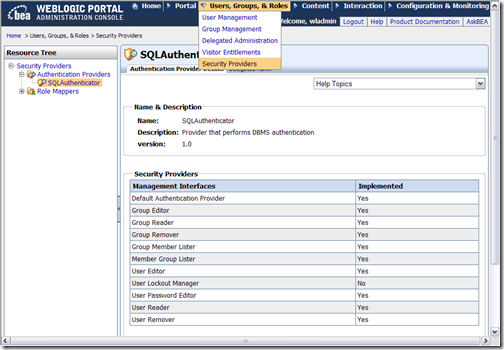
Since it does not include GroupEditor or UserEditor, you can infer that it is a read-only provider (aside from password). If you are a WLP customer, another way to see which mbeans are implemented for each ATN provider is through the Portal Administrator tool (PAT). Because the PAT disables certain user/group management functions in the tool depending on what mbeans are implemented on the selected provider, the PAT provides UI to show which mbeans are implemented. See the image below:


wlpAtnProviderMbeans


From: Colleague


Also, is there any way to create a group that includes members from more than one provider, e.g. "John" from the DB and "Bob" from LDAP? Or do you need to use roles for that scenario?


From: PJL


Yes, group membership is aggregated from the collection of installer providers. Multiple providers can contribute membership associations to a single group. Or how about this question: can "Bob" be authenticated by the SQL ATN provider, and put into the "Human Resources" group via the LDAP provider? I believe this does work.


More information...


I would encourage you to use these resources to learn more about WebLogic Security:


Add to Technorati Favorites


Comments from original blog


  • Carlo -


    OK, good to hear that it worked for you!


    We don't certify any other authorizers/role mappers. It sounds like at least some use cases work.


    Where my comment comes from is the fact that historically we had code that went around the SSPI and directly to embedded LDAP. Based on your feedback, I looked through the current code base and didn't find anything like that. I will check with the engineer who owns that code to verify. So I might have been wrong in saying it will not work at all.


    I did find a couple of places where you may see odd behavior:


    • There is code to check if the Admin server is running when doing any policy updates. This is because embedded LDAP relies on the Admin server for distribution of updates in the embedded LDAP replicates in a cluster. You will probably see errors in your logs if your Admin server is down, even if you aren't using embedded LDAP.


    • WLP has a class called LDAPChangeListener which flushes a role policy cache entry if a role policy has been updated in embedded LDAP. If you are running in a cluster, and are not using embedded LDAP, it looks like you will have to redeploy the application to get the updated role policy recognized across the cluster. Can you verify if this is true with your system?


    Thanks for the correction!


    Regards - PJL


    Posted by: plaird on January 2, 2008 at 11:31 PM


  • Hi Peter thank you for your answer. Why should the protection of WLP assets (e.g. Portlets) not work? I have written my own XACML Authorizer (based on the OpenSource SUN XACML implementation) and a RoleMapper also and it works. If WLP correctly use the WebLogic Security framework, it should work and fortunately it does ;-) Did you mean that in a future version it will not work? This scaries me because we are strongly basing our security on these implementations (and on XACML). ciao carlo


    Posted by: cdrcdr on December 21, 2007 at 6:19 AM


  • Carlo -


    What types of resources do you wish to manage with the Role and Access policies? Do you wish to entitle WLP assets such as portlets and content items, or JEE assets? For JEE assets, you could use an external repository by plugging in additional providers into the SSPI.


    But as for WLP assets, first the bad news. You will not be able to replace the entitlement engine that WLP uses for WLP assets. But I would actually argue that you don't want to replace the entitlements engine, you really want to replace the runtime policy repository. Unfortunately, WLP does not currently support storing WLP policies in anything other than embedded LDAP, except in one case (see ALES link below).


    While this isn't great news, WLP will at least remove the embedded LDAP dependency when WLP ships on WLS 10.3. You will be able to store your runtime ploicy repository in a DB then.


    Now for the good news...


    There is a solution available today. I would encourage you to look at ALES, because it does what you want to do. It centralizes role and policy management in an external repository.


    But if ALES is not suitable, there is another potential workaround here. It is possible to *manage* the policies in your external system, and then periodically sync the policies into the *runtime* repository (the embedded LDAP now, DB in a later release). An issue will be figuring out how to author WLP policies; specifically being able to create the WLP asset resource strings. Also, you will need to figure out how to allow for the external management tool to discover the set of manageable resources that do not already have policies.


    Hope this helps... PJL


    Posted by: plaird on December 14, 2007 at 8:34 AM


  • Great article! One question: we have our RoleAssignmentPolicies (XACML)as well as the AccessPolicies (XACML)in differnet repositories: we need to wtite our own XACML based authorizer (and Entitlements engine) and (possibly) remove the BEA one from the realm. Would it be possible? There would be problem/limitation doing so? regards carlo


    Posted by: cdrcdr on December 13, 2007 at 5:26 AM


  • Josh - I haven't worked with the LDAP providers in years, so I can't comment on the specifics. But in the follow up blog entry to this one, I explain how to dive into the cssWlSecurityProviders.jar to find the implementations of the BEA Atn Providers and how providers often extend other providers.


    By doing that now, I see that the BEA IPlanetAuthenticator extends the base LDAPAutenticator, which already implements UserEditor and GroupEditor. If you wish to implement custom logic for those mbeans, extending the BEA IPlanetAuthenticator provider is probably the way to go. You would create a subclass overriding the UserEditor and GroupEditor methods as necessary, and then wire it up using an XML descriptor.


    Look to the IPlanetAuthenticator itself as an example of how to wire up a provider subclass. Put your custom atn provider in its own JAR in the same directory as cssWlSecurityProviders.jar and you should be good to go.


    PJL


    Posted by: plaird on October 18, 2007 at 9:15 AM


  • Hi Peter, What steps would I need to take to add the UserEditor and GroupEditor MBeans to the IPlanetAuthenticator? If I intend for users to be created using a custom objectClass defined in the iPlanet Directory Server that has custom attributes, I'm assuming that I'll have to customize the MBean to do this. Is this correct? Thanks, Josh


    Posted by: joshbrookes on October 17, 2007 at 11:28 AM


  • Hi Luciano - yes, this is why we are keen to eliminate internal LDAP as the repository for ATZ. The best way is to have a Propagation inventory that contains a backup of your policies. In that case, you can wipe it clean, and then reapply the inventory (this is not so simple if you do admin work in production, you will need to be careful about the merge). Also, a colleague was looking into a more fine grained fix (directly updating internal LDAP to fix the problem records). I don't know off-hand where he ended up with that - I will point him to this entry. Ciao, PJL


    Posted by: plaird on September 24, 2007 at 11:40 PM


  • Hello Peter, very interesting reading. I wish that more articles like this one could be published by Bea. I take advantage of this blog to ask you a question: we have hit on a Portal9.2Mp1 production installation the infamous out of sync between embedded Ldap and the portal db (p13n tables). Result, Delegated Admin page fails with a NPE and Entitlements also are not very well. It's easy to fix this problem in a non prod environment (wipe p13n tables, wipe ldap files) but which is the recommended way to deal with this issue in a clustered production environment? Thanls a lot Luciano Fiandesio


    Posted by: koevet on September 24, 2007 at 11:21 PM


Sunday, August 19, 2007

Enterprise Greasemonkey: Solving the Greasemonkey Script Versioning Problem

As I have covered in previous blogs, Greasemonkey is a powerful client-side tool for augmenting web sites or creating mashups. It consists of a Firefox plugin coupled with scripts that are written and installed to modify web pages as they return from a web server. When this tool is brought into the enterprise, IT must sort out issues like security and deployment. I covered security in my last post, and in this installment I will look at how IT can solve deployment and versioning issues for Greasemonkey scripts.

NOTE: this blog entry was originally posted August 19th, 2007 on my previous blogging system (dev2dev.bea.com). Comments on the old blog were not transferred.

This is part 5 of a series of blog entries on Greasemonkey mashups.

The Need for Greasemonkey Script Deployment and Versioning

For this blog entry, imagine a web application in the enterprise with these characteristics:

  • It is a closed source packaged application, purchased from an external vendor.
  • It is used by a modest sized group of users, all of which are comfortable with computers and web browsing
  • There are a couple of missing features that dramatically hurt productivity
  • Those features can be easily woven into the application using a Greasemonkey script

Now, any one of those affected users could write the Greasemonkey script without involving IT. This script could then be passed around via email or a shared drive amongst colleagues. But there are few problems with this ad hoc approach to Greasemonkey:

  • As the script evolves, distribution and version management of the script will be difficult.
  • As new users are introduced to the web application, there is no formal process for getting them going with the script.
  • GM scripts are like .exe's - they can be host to malicious code. Unmanaged distribution could open the door for a hacker.
  • It is IT's mission to be the solution provider - IT should provide the Greasemonkey script.

Clearly, while IT can let the user community fend for themselves on this project, it would be far better for IT to own the solution. However, as always, unless IT can provide a solution quickly the users are apt to go with the ad hoc approach. Hopefully this blog entry will help you rapidly develop a sustainable solution, and add Greasemonkey to the list of official solutions for your enteprise.

Solving the Deployment and Versioning Issues for Greasemonkey Scripts

The rest of this blog entry discusses a solution that can provide manageability around Greasemonkey in the enterprise. It can solve the issues listed above, particularly the issues around deployment and versioning of a Greasemonkey script. This solution is by no means the only way to address these issues, but hopefully you will find it satisfies your requirements. The following describes characteristics of the solution:

  • It specifies a new landing page, or Gateway page, for the web application that users will hit before going into the app
  • This page can contain whatever you want, but it also has elements to help determine if the GM script is installed and up to date
  • The solution enforces the use of the Greasemonkey script (though it could be easily changed to make it only optional)
  • It provides version checking
  • It does not require any changes to the closed source web application
  • It is not foolproof - if the user avoids the Gateway page using a bookmark the enforcement is not run

The graphic below shows how the Gateway page fronts the web application to make sure the user has the proper Greasemonkey install. Ideally, the Gatekeeper page would be integrated into the web application's login page so a user could not bookmark their way around the enforcement. If the browser is not properly configured, the Gateway page obscures the Enter the Site button until the problem is corrected. Also note that the proper version of the Greasemonkey script should be located on a web server defined and managed by IT so the Gatekeeper page can direct the user to it if necessary.

greasemonkey_ver_arch

Versioning is implemented by including a div element on the Gateway page with the version number of the script that users should be using.

<div id="gm-script-ver-415" />


The Greasemonkey script looks for the div tag with it's version number. If it does not find it, it will not make the Enter the Site link visible.


The Solution Step by Step


Check 1: Is the browser Firefox? If not, a message discloses the problem.


greasemonkey_demo_error_IE


Check 2: Is Greasemonkey and the script installed? If not, the page offers the download links for both.


greasemonkey_demo_error_GM


Check 3: Is the Greasemonkey script the current version? If not, the page offers the download link for the latest version.


greasemonkey_demo_error_VER


Success: The browser is properly configured. The user is allowed to continue if all checks pass.


greasemonkey_demo_success


Implementing the Solution


I didn't include the code in this blog but it is attached here. The code is fairly short, and so you should be able to repurpose it for your needs quickly. Also, for illustration, I have deployed an online demo.


Online Demo


I am hoping others will provide alternative solutions - please speak up if you have built one. The solution I built is passive - it requires the user to navigate across the Gateway page. It is easy to imagine a more active solution, one that would use an XmlHttpRequest to periodically phone home to see if an updated script has been published. That type of solution would need to cache the answer, otherwise it's impact to the network could be substantial. I would think that the GM preference store could be used as a cache.


Greasemonkey Versioning on the Web:


There are others who have talked about the versioning issue. Here are some links:


GMVC (Greasemonkey Version Control)


"The objective of this project is to create a database-driven repository of GreaseMonkey Userscripts which allows for the archiving of previous versions, the release of production versions and the limited released of alpha and beta test versions through the same site."


AllPeers Blog Entry


"A first step would be to give web authors at least the option of making their sites script-friendly. This would involve placing a special header on their webpages that can be tied to a specific version of a Greasemonkey script, like so:


<head> <meta greasemonkey:somescript.js="1.2"/> </head> "


Jeff Barr's Blog


"At some point I could see the need for what we could call "Enterprise Greasemonkey," a tightly packaged version of Greasemonkey with a number of scripts installed and locked in to place. This would give system administrators the ability to deploy specialized versions of Firefox to users who don't need to know how to install, customize, or disable Greasemonkey scripts."


Resources:


Technorati Tags: ,