Showing posts with label mashup. Show all posts

Tuesday, August 26, 2008

Building a RESTful Enterprise Integration with Oracle and SnapLogic

In the enterprise space, integration problems abound.  IT must connect numerous legacy systems in new applications to adjust to the changing needs of the business. Technologies to achieve such integrations include SOAP based Web Services (WS-*) and binary protocols such as CORBA and RMI. This blog entry discusses a different approach - integration using lightweight REST APIs.

To illustrate the concept, a demo has been created showing how to combine data from Oracle's WebLogic Portal product with data from Oracle Database. This demo is accomplished using RESTful APIs as the data transport mechanism, and is orchestrated by a third party data integration product called SnapLogic. This demo was showcased at a REST Symposium I organized for Oracle employees in July, which featured speakers from Oracle, SnapLogic and Yahoo! (see below for details).


What is REST?

REST is an acronym for REpresentational State Transfer, and was coined by Roy Fielding in his PhD thesis published in 2000. It is not a technology, a standard, or a product. REST is an architectural pattern that describes the underlying architecture of the World Wide Web and how it came to be such a massively scalable computer application. The WWW is known to have the following qualities:

  • Highly scalable - millions of websites
  • Fault tolerant - at any given time, many websites are offline, but the web continues to work
  • Performance- HTTP allows for intermediaries to help improve performance via caching
  • Interoperable - nearly every computing platform has a browser, and websites are written in a myriad of languages
  • Distributed - websites and clients span the globe
  • Self describing - there is no user manual required for users to navigate the WWW

Aren't the above qualities desired for any enterprise systems as well? The power of REST lies in the idea that the same fundamentals that work so well for the WWW can also work with great success within the enterprise. 

There are plenty of resources on the web that explain the principles of REST, and so I have no intention of duplicating that material. In essence REST describes an architecture in which:

  • Application resources (objects, in the OO world) are exposed as URIs
  • HTTP requests are used to retrieve and update data on the server
  • The HTTP requests utilize the standard HTTP verbs (GET, POST, PUT, DELETE) to define the API operations, helping client developers by providing a consistent interaction model

An example is the following:

  • A client issues a request to the following URI:  http://wlp.bea.com/dvt/api/content/autos.jsp
  • The server response contains a list of automobiles, described in a format such as XML
  • The client consumes the XML document and outputs the entries that match the user's criteria

This pattern is seen most often with Rich Internet Applications (RIA), where the client is a browser and the API is being invoked via Ajax (more precisely, the JavaScript XmlHttpRequest facility). While this is a very powerful use of RESTful APIs and is alone enough to justify the creation of RESTful APIs, this use case is not the focus of this blog entry. I would encourage you to research Ajax application development for more background.

Instead, we will look more closely at how RESTful APIs can also make data integration easy.


RESTful Integration in Concept

RESTful APIs expose data in a way that is easily consumed. Invoking the API is as easy as issuing an HTTP request, which is possible to do from almost any programming language/platform. While enterprise data integration can be implemented using a wide variety of technologies, the purpose of this blog entry is to show how it can be done with RESTful APIs.

As stated in the preamble, there are non-RESTful approaches to solving this problem. A SOAP based solution could be implemented and for some cases is the preferred approach. If your use case requires the support of the WS-* family of standards, then WS-* is the way to go. What this example shows is that REST offers an alternative and is appealing in its simplicity.

Instead of discussing the theory, it is more useful to look at a working example.

Example: Oracle WebLogic Portal + Oracle Database + SnapLogic + REST

Consider the following example:

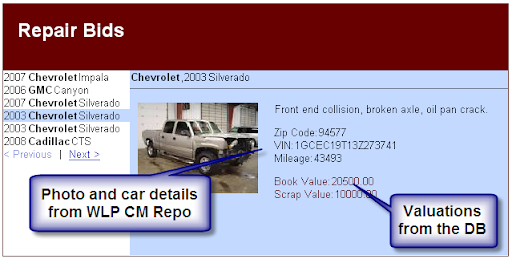
  • An insurance company is using the Content Management capabilities of Oracle WebLogic Portal to store auto claims. Each claim contains a photo of the damaged vehicle, and some data about that vehicle such as make, model, year and a description of the damage.
  • The insurance company also has a Oracle Database that is populated with industry data regarding the fair market value of the cars, and the salvage value. These values are specific to the make, model and year.
  • The insurance company wishes to put the repair of the damaged vehicles out to bid to a community of auto repair shops. The intent is to allow shops to bid on the vehicles they are willing to repair using the industry data and the information from the claim.

The insurance company decides to use a quick and lightweight approach to build a data mashup with a web UI. The implementation is achieved using RESTful APIs, and orchestrated using a product called SnapLogic. SnapLogic is an open source server that provides:

  • Many pre-built connectors to expose native data sources as RESTful APIs (e.g. database, spreadsheet, XML)
  • Sophisticated data manipulation capabilities, such as joins, filtering, sorting, and computations
  • A variety of output formats for the completed RESTful feed

The data integration demo was implemented as follows:

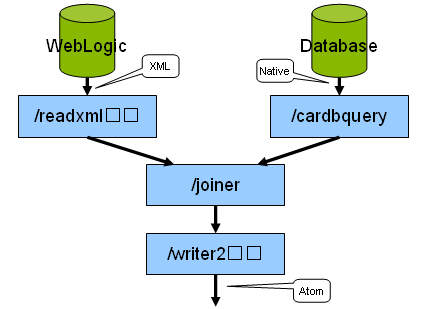
  • A RESTful API is configured for the WebLogic Portal (WLP) Content Management system. In this example, the RESTful API was custom built as a JSP, but this capability will come pre-built in a future version of WLP.
  • The Oracle Database schema is exposed as a RESTful data API using an out of the box Database Reader component of the SnapLogic server.
  • The two data sources are joined using a SnapLogic pipeline. The pipeline reads the claims from WLP CM and the industry data from the database using the RESTful APIs.
  • The joined data is converted into an ATOM syndication feed via the SnapLogic server (using an Xml Writer component)
  • The ATOM feed is displayed in a ATOM reader, in this case the Google Mashup Editor UI

All of this is achieved via configuration, not code. The architecture is depicted in this diagram:
image

The resulting web application appears like this:
image

For more detailed information on the implementation of this mashup, consult the companion entry on SnapLogic's blog:

Oracle and REST

This is a simple demonstration that shows the ease of implementing integrations using RESTful techniques, especially when combined with a REST integration enabler such as SnapLogic. It is a stated goal of some of the Oracle product groups to provide RESTful APIs for access to product data. Check with the roadmap for each product to understand when these APIs will be available.

Attendees to Oracle Open World 2008 will have several sessions related to Oracle product groups and REST:

Oracle Internal REST Symposium

For Oracle employees, more information is available on the company intranet. I organized an internal symposium on REST amongst the product groups on July 28th, 2008. The event included speakers from Yahoo! and SnapLogic.

eventLogo

The agenda covered a number of RESTful topics, including:

  • Explaining REST (Subbu Allamaraju of Yahoo!)
  • Industry product landscape - SnapLogic (Mike Pittaro, CTO SnapLogic), and other products
  • Enabling technologies - RESTlet, JSR 311, WADL, JSON marshalling
  • Oracle Product efforts - presentations by various products groups on their REST efforts

Access to the recordings and slide decks can be found on the intranet here.

Resources

You may find the following links helpful:

Tuesday, April 22, 2008

Introduction to Google Gadgets

We have been showing how to expose WebLogic Portal portlets as Google Gadgets for almost two years now. Embarrassingly enough, we haven't written any blogs or articles on HOW to do it. We have answered email questions about it, but nothing public. This two part blog series will correct that omission. You will hopefully see that it is really quite simple to do. This first entry will talk about building a generic Google Gadget (without WLP), and then the following entry will show how to convert any WLP portlet into a gadget.

NOTE: this blog entry was originally posted April 22nd, 2008 on my previous blogging system (dev2dev.bea.com).

What are Google Gadgets, and iGoogle, please?

Google Gadgets are web based widgets/portlets/[insert your favorite web component term here] that are based on technology provided by Google specifically to make federating gadgets easy. To see gadgets in action, the best place to try them out is on the iGoogle portal.

Gadgets can really do anything. This example shows an eBay integrated gadget that allows a user to interact with their eBay account within the gadget:

image

The technology provided by Google can be lumped into these buckets

  • An xml file format for describing a gadget (called the descriptor)
  • A gadget preferences model - for storing user specific preferences for a gadget external to the gadget implementation
  • Various JavaScript libraries for doing useful things
  • An online directory of pre-built gadgets
  • iGoogle - the reference platform for users to use gadgets
  • Google Gadgets for your Webpage - a JavaScript mechanism for including a gadget on ANY web page

Several things are notably missing from what Google provides with regard to gadgets

  • Gadget hosting - aside from a few official Google gadgets, all the gadgets are hosted independently by their creators
  • Gadget validation - treat every gadget with suspicion; even though it is flying the colors of a well known brand it may be hosted by a guy in a basement.
  • Authentication - there is no provided mechanism for gadgets to inherit authentication from the consuming page, notably no single sign on with iGoogle

Finally, note that there is another gadget technology offered by Google called Desktop Gadgets. There gadgets are targeted toward Google Desktop, and aren't related to the gadgets we are discussing.

The Google Gadget Phenomenon - why should you even care?

Google Gadgets and iGoogle were the fastest growing product offered by Google in 2006 and had strong growth again in 2007

“The star performer for [2007] was Google’s personalized start page service iGoogle which increased traffic in the 12 months to November by 267.64%.” (TechCrunch)

Useful Gadgets get heavily used:

“The Google gadget ecosystem received 960 million pageviews last week” (Niall Kennedy)

These metrics are largely based on use of gadgets and iGoogle in the consumer space. But consider how your enterprise can benefit from deploying Google Gadgets:

  • A new channel to your customers within iGoogle
  • Offered as a widget to your customers to place on their own web pages
  • A new channel to your partners/employees within iGoogle

Building a Simple Google Gadget - as easy as falling off a bike?

This section discusses the express route to building a gadget. Steps to build:

  1. Create a gadget implementation, which is nothing more than an HTML document served from a public web server.
  2. Create a gadget XML descriptor, that refers to the gadget implementation.
  3. Add the gadget to iGoogle.

Step 1: Create the Gadget Implementation

Save this HTML into a file on a public web server.

<html>

<body>

Hello World.

</body>

</html>

Step 2: Create the Gadget Descriptor

Save this XML into a file on a public web server (I have also hosted one publicly here for now: http://wlp.bea.com/blogs/simplestGadget.xml). You will need to update the href included in the body to the URL to your HTML document created by step 1.

<?xml version="1.0" encoding="UTF-8" ?>

<Module>

<ModulePrefs

title="Simplest Gadget"

directory_title="Simplest Gadget"

title_url="http://wlp.bea.com"

description="Very very simple gadget."

height="120"

author="Peter Laird"

/>

<Content href="http://wlp.bea.com/blogs/simplest.html" type="url" />

</Module>

Step 3: Add the gadget to iGoogle

Login to iGoogle, and then click the Add Stuff link, and then Add Feed or Gadget link. Provide the URL to the XML document created in step 2.

image

Step 4: Enjoy!

image 

Next Steps

In the next blog post, I will show how to expose any WLP portlet as a Google Gadget. Stay tuned!

References

I only covered a small part of the Google Gadget technology. Their developer documentation is excellent, so please refer to it for more details:

Technorati Tags: ,

Thursday, July 5, 2007

Building a Greasemonkey Mashup Tutorial

Ever wonder what a mashup between Tim O'Reilly (technology guru) and Alfred Chuang (BEA CEO) would look like? Well, that might not be pretty but a mashup between O'Reilly Safari and BEA dev2dev holds more promise. What's not to like: embed a world class online technical library (Safari) into a world class enterprise developer web site (dev2dev). Sounds like a winner. Let me show how this easily done with the browser based mashup tool called Greasemonkey.

NOTE: this blog entry was originally posted July 5th, 2007 on my previous blogging system (dev2dev.bea.com). Comments on the old blog were not transferred.

This is part 2 of a series of blog entries on Greasemonkey mashups.

The Magic of Greasemonkey

As I demonstrated in my last blog entry, it is very easy to meddle with any web site you visit on the web. The tool that makes this possible is Greasemonkey, a project started by Aaron Boodman, which enables you to inject, modify or delete pieces of a web page. And all of this is done client-side in the Firefox browser. As an example, in my previous blog entry I showed how easy it is to add a new link to the dev2dev web site. For that case, the Greasemonkey script simply found the right injection point in the page, and then blasted in a new link into that spot.

If you read Mark Pilgrim's Dive Into Greasemonkey online manual or his Greasemonkey Hacks book, you will find all sorts of things to do with an HTML document. You can slice and dice a page anyway you want. For example, one scripter wrote the Ad Blocker user script that deletes ads magically from any page. Also, writing Greasemonkey scripts for GMail seems to have become a cottage industry.

If you stretch the term mashup, you can even call the results of these activities mashups. The target web site is being mashed up with the Greasemonkey user script. But how about creating a more definitive mashup - can the script inject elements from a second site into that target web site? Once again, this is easily done in Greasemonkey and this blog will show you how.

O'Reilly Safari + BEA dev2dev

As mentioned in the preamble, the mashup will target BEA's dev2dev website like in my previous blog entry. However, in this tutorial, I will show you how to inject dynamic content from another site: O'Reilly's book catalog. The idea is this: as you read blogs and articles on BEA dev2dev about web technologies (JSON, Ajax, JavaScript, Greasemonkey, etc), it would be nice to have a list of embedded links to O'Reilly's book catalog. This will be helpful if you wish to find a book to learn more about the technology you are seeing in the blog or article. Further, this list will include links to the O'Reilly Safari online library, giving you instant access to in-depth books and papers on that topic. Safari eliminates the need to order an O'Reilly book via mail - almost the entire O'Reilly catalog is conveniently available for reading online.

BEA dev2dev does not currently have this O'Reilly feature, but that is not a problem. I will build a mashup in this blog entry using Greasemonkey to create this feature.

Let's get started...

Building a Web Mashup with Greasemonkey

I will assume you have read my previous blog entry and that you understand:

  • What Greasemonkey is, and how it performs it's magic in the Firefox browser without modifying the target site
  • How to inject HTML into a location on a web page
  • A basic familiarity with a programming language like Java, JavaScript, etc

Additionally, you need to understand in essence what the XmlHttpRequest is, which I will cover immediately. The XmlHttpRequest is the heart and soul behind that Ajax buzzword you probably have heard something about. It allows the browser to issue HTTP requests programmatically from JavaScript. The XmlHttpRequest quietly operates behind the scenes on a page to gather information from a web server. This feature is used along with code to modify the current page (called DOM manipulation) to update small pieces of the page without causing a full page refresh. This is Ajax. There are detailed articles on the subject like this one from David Teare on dev2dev if you would like to learn more.

To build the O'Reilly Safari + BEA dev2dev mashup, the XmlHttpRequest will be the cornerstone of the solution. When the user browses to a blog or article on dev2dev, the Greasemonkey script will issue an XmlHttpRequest to the O'Reilly web site to gather a list of books that are relevent. It will pass the title of the blog or article as the search query, and it will specify that only 3 books are wanted in the result set. Once the response is received, the Greasemonkey script will extract the summaries of those 3 books and inject that list into the blog or article.

As a starting point, look at this mashup tutorial article of mine on dev2dev: Mashup Article. Now, see the image below to see the end result of this mashup with the O'Reilly links injected:

greasemonkey_oreilly_injected.png

What about the Single Origin Policy?

If you have read about mashups in general or the XmlHttpRequest specifically you will perhaps see a problem with the plan I outlined above. Browsers have universally implemented a security policy that affects the XmlHttpRequest. This policy is called the Single Origin Policy (SOP), and is designed to prevent Cross-Site-Scripting (XSS) attacks. The details of XSS aren't important here, but the SOP is. The SOP prevents an XmlHttpRequest from targeting a URI from a network domain different from the parent page. For example, if a user types http://dev2dev.bea.com in the address bar of his browser, an XmlHttpRequest triggered from that page cannot target http://hack.evil.com. The SOP limits the XmlHttpRequest to the bea.com domain. This is security and this is good.

So how about my plan to implement this mashup? If the user targets a blog or article on dev2dev.bea.com, how is it possible to send an XmlHttpRequest to an O'Reilly web property? The answer is that Greasemonkey scripts operate at a higher privilege level than ordinary page JavaScript. The SOP does not apply to XmlHttpRequests driven from Greasemonkey scripts. So we are clear for take off with this mashup implementation!

greasemonkey_oreilly_arch.png

Building the Script

I will once again assume you have read my previous blog entry and understand how Greasemonkey can inject HTML into a page. What I will show here is how to issue an XmlHttpRequest to a website from a Greasemonkey script and how to process the results to extract the required information. That information will then be injected into the dev2dev blog or article using the technique already covered. The full script is publicly available on the Greasemonkey script repository here: dev2dev Oreilly Script. I encourage you to look at the full script, install it, and use it when visiting dev2dev in the future.

What follows is the partial script listing. It shows these elements:

  • Constructs the URI - sets a parameter to constrain the query to 3 results, and sets the blog/article title as the book query
  • Invokes the XmlHttpRequest to the URI, passing a callback function to invoke when the response is received
  • The callback function parses the response and injects the list of books into the page
// SNIP - code removed for brevity.
// The full script finds the right place in the DOM
// to inject the O'Reilly results

if (commentsAnchor)
{
// build our not-quite-REST URL, not oreilly.com but
// nevertheless it is the O'Reilly book query.
// Note: passing blog title as the query string
var oreillyUrl =
'http://search.atomz.com/search/?sp-a=sp1000a5a9'+
'&sp-t=store&sp-x-1=cat&sp-x-2=cat2&sp-q-2=Books'+
'&sp-c=3&sp-q='+
document.title;
GM_log('URL: '+oreillyUrl);

var user_agent = 'Mozilla/4.0 Greasemonkey';

// go ask Tim what he would recommend based on the
// blog/article title
GM_XmlHttpRequest({
method: 'GET',
url: oreillyUrl,
headers: {
'User-agent': user_agent,
'Accept': 'text/html',
},
onload: processOreillyResponse
});
}
else {
GM_log(' Error: did not find a comment anchor');
}

// callback from the XmlHttpRequest with response
function processOreillyResponse(responseDetails)
{
oreillyHTML = responseDetails.responseText;

// we want to find this HTML in the response since
// it delineates the list of books:
/*
<!-- ResultListStart -->
blah blah
<!-- ResultListEnd -->
*/
var start = oreillyHTML.indexOf(
"<!-- ResultListStart");
var end = oreillyHTML.indexOf(
"<!-- ResultListEnd -->", start);
GM_log("Clipping start: "+start+" end: "+end);
var result = oreillyHTML.substring(start, end-1);

if (result)
{
oreillyHTML = result;

// create the HTML element containing the list
resultsElement = document.createElement(
"placeholder");
resultsElement.innerHTML = oreillyHTML;

// inject the list into the page
commentsAnchor.parentNode.insertBefore(
resultsElement, commentsAnchor);
}
else {
GM_log("Nothing was returned from the clipping");
}
}


Once this script is installed into Firefox, Greasemonkey will properly inject O'Reilly book results into dev2dev pages. Furthermore, the results returned from O'Reilly are conveniently marked up with links to the traditional book catalog, and also to Safari. So with a single click from the blog or article, you can navigate to Safari and dive into a full length book on the technology you just read about on dev2dev. Nice!


Next: Is Greasemonkey a Good Mashup Solution in the Enterprise


If you have been following my blog you will know that I like to evaluate how to use various mashup technologies in the enterprise. I do have an opinion in this regard with Greasemonkey, but it's more than a few paragraphs worth of material. I will delay diving into this topic until my next post. Actually I am debating how to cover it - I may stretch this discussion across the next 3 blog posts, or perhaps I will blast it all in just one. We need to look at various issues such as versioning, Greasemonkey's inverted security model, and Greasemonkey's mashup sweet spot. Subscribe to my blog feed and you'll be sure to catch the discussion however I package it.


Further Reading:


Monday, July 2, 2007

More Mashups: Using Greasemonkey to Weave New Features into Web Sites

With this blog entry I am continuing the theme of demonstrating tools to help you build mashups. In this case, I will show how a tool called Greasemonkey can be a powerful approach for building browser side mashups. Greasemonkey is a plugin to Firefox that allows a script developer to inject useful Javascript into any web page. This capability enables you to add new features to sites that you do not own. I will show in this blog how you can add a new feature to the dev2dev website, without having access to the dev2dev code. Later, a follow-up blog will show how this same technique can create a feature on dev2dev that includes data from a different web site, producing a true mashup.

NOTE: this blog entry was originally posted July 2nd, 2007 on my previous blogging system (dev2dev.bea.com). Comments on the old blog were not transferred.

This is part 1 of a series of blog entries on Greasemonkey mashups.

Client side Code Injection with Greasemonkey

Greasemonkey is just cool - and I have been having a lot of fun playing around with it. It operates on a simple principle, but delivers massive power from that simplicity.

Greasemonkey allows you, a Javascript developer, to write a script that gets included into web pages that a user visits with the Firefox browser. This script can do really anything, but usually it will inject/update HTML elements into the page to create entirely new features for that web site. The targeted web site need not have any idea that this is going on - the Greasemonkey script is executed on the browser after the original page comes back from the web server.

To be useful, a Greasemonkey script generally will be targeted towards a specific web site, though a general purpose script is possible. The developer specifies which URLs (with wildcards) are valid for the script. The Greasemonkey plug-in in Firefox will silently watch the user's URLs as they browser, and will inject a script when appropriate.

To be clear, Greasemonkey is not installed by default, nor are the scripts that you write. It is an opt-in activity for the user to both install Greasemonkey and then each script that they want to have. This means that Greasemonkey is not quite as accesible as other mashup solutions that I have written about - the mashup here is not a URL. The user must be skilled enough to install Greasemonkey and your script.

greasemonkey_arch

Greasemonkey Hello World

Installing Greasemonkey is straightforward: you will find the download link at the Greasemonkey Home Page. You will need to use Firefox of course, but otherwise it can't go wrong. After you have it installed, the next step is to install your first Greasemonkey script.

Unlike a lot of cutting edge projects out on the web, Greasemonkey has excellent documentation. Primarily, the best place to go for an introduction, tutorials, and documentation is Mark Pilgrim's online book, Dive Into Greasemonkey. The book is quite comprehensive and is geared towards getting you on your feet quickly.

To that point, the Hello World example for Greasemonkey that I will show is derived directly from Mark's book. The example below has been stripped of comments for brevity, but otherwise is identical to his original found here. This script is offered as a public file named helloworld.user.js. By the file extension, you know that this is nothing but JavaScript. And a closer look will show that it contains some meta-data within the comments, and then a single JavaScript function call to alert().

The meta-data is hopefully self-explanatory: it instructs Greasemonkey to execute it on any (*) site except for a couple of exclusions. If you install Greasemonkey, and then install this script helloworld.user.js by clicking on the link, you will see that it just pops up an alert box for every page view.

// Hello World! example user script
// version 0.1 BETA!
// 2005-04-22
// Copyright (c) 2005, Mark Pilgrim
// Released under the GPL license
// http://www.gnu.org/copyleft/gpl.html
// ==UserScript==
// @name Hello World
// @namespace http://diveintogreasemonkey.org/download/
// @description example script to alert "Hello world!"
// @include *
// @exclude http://diveintogreasemonkey.org/*
// @exclude http://www.diveintogreasemonkey.org/*
// ==/UserScript==

alert('Hello world!');


greasemonkey_install


Mr. Wong and BEA dev2dev


If you visit BEA's dev2dev site, you will notice that Jon has helpfully included links to popular tagging services on all articles and blogs. This allows you to quickly tag the article or blog using del.icio.us, Digg, DZone, Furl or Reddit. See the image below to see how the site works today:


greasemonkey_mrwong_orig


However, what if that list is not sufficient for your needs? That is my problem - there is one tagging site that I use that is not listed. As an aside, I have been doing research into the spread of Web 2.0 in China. In doing that work, I have been tagging chinese articles that I find, and some english ones just to be helpful. I am not using an english language tagging site, I am using Mr. Wong, which is a Chinese language tagging site. I would like to have Mr. Wong as one of my tagging options when browsing dev2dev. But since I don't have access to the dev2dev code, I cannot add it.


Weaving Mr. Wong into BEA dev2dev Using Greasemonkey


Enter Greasemonkey.


The process for developing a Mr. Wong feature on dev2dev is as follows:


  • Navigate to dev2dev, and View Source on the HTML for blogs and articles


  • Note that the tagging links box is easily found in both by looking for the last div tag with class box_gray


  • The div tag contains a simple HTML table, all we need to do is add a new row


  • Formulating the link to Mr. Wong is easy: we just need the document title and url. Both are easily available in JavaScript


  • Write the JavaScript!


Before I show the code for the script, here is the result:


greasemonkey_mrwong


As you can see, even though I did not have access to dev2dev code, I was able to easily add a brand new feature to it!


The Mr. Wong Script


The script used to add this feature to dev2dev is below. But if you would like to try it out, or view the live version, navigate to my script repository for Greasemonkey (or here if that link does not work). Install the script named dev2dv Mr Wong. The code roughly follows this path:


  • Find the last box_gray div tag on the page, this is the tagging box


  • Find the inner table in that div


  • Add a new row to that table


  • Populate the row with a link and image for Mr. Wong


// ==UserScript==
// @name dev2dev Mr Wong
// @namespace http://dev2dev.bea.com
// @description Injects a link to Mr Wong on each blog/article link
// @include http://dev2dev.bea.com/blog/*
// @include http://dev2dev.bea.com/pub/*
// ==/UserScript==

var divTagsWithClass, taggingDiv;
GM_log('Running dev2dev Mr Wong script');

// get the existing tagging div box
// by looking for the class (box_gray)
divTagsWithClass = document.evaluate(
"//div[@class='box_gray']",
document,
null,
XPathResult.UNORDERED_NODE_SNAPSHOT_TYPE,
null);
// the tagging div appears last
taggingDiv = divTagsWithClass.snapshotItem(divTagsWithClass.snapshotLength-1);

if (taggingDiv)
{
// find the table
tableTag = taggingDiv.getElementsByTagName('table')[0];
if (tableTag)
{
// create the new row
var lastIndex = tableTag.rows.length;
newLinkTR = tableTag.insertRow(lastIndex);

// create the td for image and set styles
var newLinkTD = newLinkTR.insertCell(0);
newLinkTD.valign = 'bottom';
newLinkTD.width = '20';

// build the HTML
newLinkTD.innerHTML = '<img src='+
'"http://www.mister-wong.cn/favicon.ico"'+
' alt="Mr. Wong" border="0" height="18" '+
'hspace="8" width="18">';

// create the td for the image
var newLinkTD = newLinkTR.insertCell(1);

// set the styles
newLinkTD.nowrap = 'nowrap';
newLinkTD.valign = 'bottom';

// build the HTML
newLinkTD.innerHTML =
'<a href="http://www.mister-wong.cn/index.php?'+
'action=addurl&v=1&bm_url='+
window.location+
'&bm_description='+
document.title+
'">'+
'Mr. Wong</a>';
}
else {
GM_log(' Error: did not find the tagging inner table');
}
}
else {
GM_log(' Error: did not find a tagging div');
}


Pros and Cons


Hopefully you can see the power and simplicity of the Greasemonkey plugin. In a follow up blog I will show how you can take this technique further by injecting data from other sites to create a true mashup. Here is what I see as the pros and cons of this tool:


  • Pro: it is easy for a developer to install both the plugin and scripts


  • Pro: a seasoned JavaScript developer can crank out features in little time


  • Pro: you do not need access to the web site's code to add new features


  • Pro: the documentation and developer community around Greasemonkey are superb


  • Con: mashups created with Greasemonkey aren't exactly URL accessible, it requires install steps


  • Con: Greasemonkey is not supported on IE or any browser other than Firefox


  • Con: there is a significant security issue that I will cover in my next blog entry


References


Technorati Tags: ,


Tuesday, June 26, 2007

BEA WebLogic Portal + Swivel.com + Excel Spreadsheet = Enterprise Data Mashups

IT works hard to build web applications and other infrastructure to support the needs of information workers within the enterprise. However, it is commonly found that significant portions of the business are managed using ad hoc processes based around email and spreadsheets. While we have been tackling the issue of collaboration via email for years, we should also be looking at the role of spreadsheets and the amount of data locked up inside of them. In this blog entry I will explore an approach that allows spreadsheet data to be managed by IT, and then visually mashed up with other data sets. This solution combines the Content Management capabilities of WebLogic Portal with the data mashup features of Swivel.com.

NOTE: this blog entry was originally posted June 26th, 2007 on my previous blogging system (dev2dev.bea.com).

Mashups in the Enterprise

While mashups started in the consumer space, mashups are beginning to migrate into the enterprise space as well, as noted by technologists such as Dion Hinchliffe. The promise of cheap, quick and easy applications that tie together existing assets is appealing to both IT and the business. Enterprise mashups don't intend to solve every problem, but they do deliver rapid results with enough functionality to draw in the information workers. In previous blog entries and a webinar, I have been showing how to build enterprise mashups using web technologies. This entry will diverge and show how a non-web technology, namely the spreadsheet, can power an enterprise data mashup.

The enterprise data mashup will be built using two products that will be combined to help IT manage spreadsheets within the enterprise. First, I will use the Content Management capabilities of WebLogic Portal to manage the workflow of spreadsheets. Second, I will show you how a new tool called Swivel can extract valuable information out of spreadsheets, visualize it, and then combine in with other data to produce an enterprise data mashup. Finally, the output of Swivel will be fed back into WebLogic Portal Content Management, completing the lifecycle.

wlp_swivel_excel_mashup

Managing File Based Assets using WebLogic Portal's Content Management

As a developer, you can probably appreciate the peril in not using a source code control system. Some of us have worked at places where the central code repository for an application is some guy's machine. The integration environment has a name, like "Larry" or "Bob", and is powered by bagels and coffee. With the widespread use of source code control systems, hopefully you haven't seen this in quite some time.

The same should apply to the non-developer community as well. Instead of source code repositories, file based documents should be managed with a content management system. Without belaboring the point, here is a list of features that make a proper content management system a critical component to deploy in the enterprise:

  • Versioning - roll back that bad checkin from 3 AM
  • Locking - ever had to hand merge two spreadsheets? A checkout mechanism can do wonders
  • Auditing - nothing is more fun than playing the blame game when the train wreck happens
  • Workflow - because who can keep track of who needs to sign off on that press release
  • Search - philosophically, if a document cannot be found, does it really exist?
  • Security - spreadsheets with salary information have a habit of just turning up on public shared volumes; this is bad
  • Virtualization - there will never be only one, so WLP serves as a virtualization layer across multiple repositories
  • Reuse - documents stored on a worker's laptop are not available for other uses

Because this blog entry is ultimately about enterprise mashups, the last point it especially relevent. Before you can pursue an enterprise mashup project for the enterprise data in these documents, they must be accessible. A content management system is the natural tool for that job, and therefore the first step in this type of project.

Using Swivel to Mashup Enterprise and Public Data

Swivel (www.swivel.com) is a startup funded by Minor Ventures in the bay area. Swivel offers a hosted service that aims to be the YouTube of spreadsheets. It allows the general public to upload spreadsheets from all corners of life, and provides mashup capabilities to combine those data sets to produce meaningful graphs. The intent of this service is to, in their words:

Swivel's mission is to liberate the world's data and make it useful so new insights can be discovered and shared.

What lies underneath that high-level statement is a rich web interface to a powerful data mashup engine. To get right to the point, the workflow to have in mind when using Swivel is as follows:

  • Upload one of your spreadsheets
  • View the graph of the data from that spreadsheet
  • Find a public data set that may correlate to your data (world temperatures, Dow Jones average, GDP by nation, etc)
  • Mash them together to create a combined graph - which may show interesting correlations

To take a short tour of the service, visit the Swivel Tour. Or, just visit the site and start clicking around, it is fairly intuitive. Here is a screen shot of the tool in action:

swivel_tool

And the result of a mashup - this graph is measuring the sales of Avitek Air Conditioners against world temperature fluctuations. There appears to be some correlation:

swivel_avitek_temp

The graph above is a sample enterprise data mashup. It shows how sensitive Avitek sales are to weather, which could affect projections and planning for the company's future. This seems valuable to me. In the real world, perhaps you will find some interesting trends that have not yet been identified in your company's performance. It's hard to really say until you give it a try.

But I know what your first question will be, because it always the first question no matter what the topic is. What about security? Who in their right mind would publish sensitive enterprise data to a hosted service? First, ever hear of Salesforce.com? Second, Swivel will offer a private data service in the near future that will allow you to keep your uploads private.

The remainder of this blog entry will cover an integration that I built that combines the Content Management features of WebLogic Portal with the data mashup capabilities of Swivel.

A Look at the WebLogic Portal and Swivel Integration

Note: please don't get the wrong idea about the status of this integration. I built this integration as a working demonstration of the combination of two great products. The code will be made available on dev2dev Code Share, and is not faked in any way. The integration uses only public BEA APIs, and those APIs are supported. But the integration itself is not an officially supported BEA product or solution.

The integration consists of a portlet that is deployed into WebLogic Portal. This portlet is custom designed to manage your Swivel graphs. It also provides an easy user interface to publish new spreadsheets to Swivel in order to create new graphs.

swivel_portlet

The integration is based on the following workflow:

  • A spreadsheet is created in Excel
  • The spreadsheet is managed in WLP Content Management, with features such as versioning, workflow, and security
  • The Swivel Portlet is used to locate and publish the spreadsheet to Swivel as a new data set
  • The data is mashed together with other Swivel data to create a new interesting graph
  • The graph is published back to WLP Content Management, to complete the lifecycle
swivel_wlp_arch

Watch, Learn, and Swivel!

Sometimes the best path towards understanding is to see a demo, and I think this is one of those times. To support this, I have recorded a video of the integration, showing all of the important parts and how they hang together.

Instructional Videos:

To view the demonstration videos, navigate to the video page, or click on one of the links below:

  • Part 1: adding the Swivel portlet to WebLogic Portal
  • Part 2: navigating the library of spreadsheets and graphs in WebLogic Portal
  • Part 3: publishing a spreadsheet from WLP Content Management to Swivel
  • Part 4: using the Swivel user interface to create compelling enterprise data mashups from spreadsheets
  • Part 5: completing the round trip, bringing the Swivel graph back into WLP Content Management

Hosted Demo:

To try the integration hands-on, follow these steps:

  • Navigate to the WLP 10 Playground at wlp.bea.com
  • Create a user account
  • Add a Page by clicking on the Add Page tab
  • Add the Swivel portlet by clicking on the Add Portlet link and dragging the Swivel portlet to your page
  • Start Swivelling!

CUFS - Measuring the Potential of Swivel

Swivel aims to empower information workers to build data mashups, but is it on target? I have covered other mashup tools in previous blog entries. Some of the tools I have blogged about are developer focused, and I also covered Schmapplets which is a mashup tool targeted at non-technical users. With the Schmapplet blog entry, I proposed 4 metrics for determining if a non-technical user will find success with a particular tool. Those 4 metrics, abbreviated as CUFS, are as follows along with how Swivel measures up to each:

  • Comfortable: spreadsheets are in that sweet spot of comfort for many Information Workers
  • Useful: it is up to you to decide: what can Swivel do for you? Please give it a try, and post a comment below
  • Focused: it's a focused use case, which allows the UI to be specialized and avoids the need for coding
  • Simple: as a hosted service it is pretty easy for both IT and the business. Just write a check and away you go!

To summarize, I think Swivel is on the right track towards building a workable mashup toolset for the information worker.

Last Mile for Swivel

Swivel is currently in Preview mode, which means not all of the intended features are in place. With that said, the site is already quite usable and can be employed for general use within the enteprise. However, a couple of additional features will be needed to allow Swivel to really take hold within the enterprise. Fortunately, they are already in plan to be delivered for the official launch of the service.

Two key features for enabling Swivel within the enterprise:

1. Private data
I covered this above; sensitive enterprise data cannot be publicly available. The revenue model for Swivel depends on getting this feature in, so I think it's a safe bet to assume it's coming soon.

2. Data API
The current integration requires the user to manually publish graphs back to WLP. It would be nice for this process to be automatic, which would be possible if a data API is available. I have been in communication with the Swivel team, and it sounds like this API is forthcoming.

Resources:
  • dev2dev Code Share - the Swivel portlet for WLP will be posted on Code Share, I will update the comments below with the direct URL (as of 2009, CodeShare  is offline an unavailable)
  • wlp.bea.com - WebLogic Portal Labs, demos of the latest thinking from the WLP engineering team
  • Swivel - spreadsheet driven data mashups with Swivel
  • My Articles and Blog - more writings on mashup tools and WebLogic Portal
  • Swivel blog - see what the Swivel guys are up to
  • James Dellow and Mark Bower blogged their opinion that Excel is in fact one of the earliest forms of a mashup tool
Technorati Tags:

Comments from Original Post
  • The Swivel Portlet for WebLogic Portal has been submitted to dev2dev Code Share. It can be found at this location.

    Posted by: plaird on June 26, 2007 at 11:32 AM

Monday, June 11, 2007

Google Maps Mashup Tool for Non-Technical People - schmapplets.com

If your mashup doesn't use Google Maps, do you really have a mashup? Of course, but Google Maps certainly is the accessory of choice for most mashup implementations. I wrote an article for dev2dev about how a programmer can easily create a Google Maps mashup using Ajax, JSON and the Google Maps API. A tool called Schmapplets has taken a different approach - it provides non-technical authors a rich tool to build a Google Maps mashup. This has no direct relevance to BEA, but I am blogging about it because it is an interesting approach to mashups from the consumer space. As we look at bringing mashups into the enterprise, we need to have tools to allow non-IT people to construct their own applications. What can be learned from Schmapplets?

NOTE: this blog entry was originally posted June 11th, 2007 on my previous blogging system (dev2dev.bea.com). Comments on the old blog were not transferred.

Check your Programming Skills at the Door

If you are a programmer, building a mashup is a task that is well in reach. I have covered several approaches in my blogs and articles, and the dev2dev Tech Days seminars covered this topic in detail. Here are a few resources to get you up and running quickly:

But this blog entry is not about the programmer powered mashup. This blog entry looks at a tool that enables non-technical users to assemble a mashup.

The Mom Test for the Consumer Market

What do I mean by a non-technical user? I don't mean someone who has little experience with a computer and the web (that's the Grandma Test). We all have someone in the family who can use a computer fairly well, but are definately not programmers or techies. These people can read email, surf the web, install new software, upload digital pictures, and will use Windows OS. In my family, that's Mom. And so I will use the term Mom Test when evaluating how well tools intended for the consumer market address this skill set.

What are Schmapplets?

Schmapplets is a tool for creating a very specific mashup. It's so specific, it is debatable whether its an actual mashup or just a good integration with that universal mashup litmus test - does it use Google Maps? We won't dwell on that question because it isn't important, we will call it a mashup and take a good look at what they have done. The mashups that Schmapplets creates have these characteristics:

  • The mashup is centered around the Google Map for a single city
  • The mashup creator enters a set of addresses, perhaps indicating favorite coffee shops, stores or restaurants
  • For each address, the creator adds a description, photos, and a rating.
  • The Schmapplets team has already plotted numerous hotels, restaurants, shops and tourist attractions into the location list

In its implementation, Schmapplets has chosen to build a fat-client tool for the mashup creator. This tool is the data entry platform. With it, the mashup creator enters in a series of addresses, along with pictures and descriptions, which are plotted on the map. Once created, the mashup creator publishes the mashup which is uploaded by the tool to the Schmapplets web servers. Users of the mashup view the mashup in a browser, like most other mashup implementations.

View of the mashup creator tool:

schmap_fatclient_500w

View of the the finished mashup, rendering in a browser:

schmap_browser_500w

Follow these links to learn more about Schmapplets:

Schmapplets Passes the Mom Test

While I haven't done a field test to prove it, I suspect that Schmapplets is fit for Mom. Er, with a few caveats:

  • Someone would need to explain what a mashup is, and why she should build one
  • Someone would need to point her to this solution - she would not find it on her own
  • Someone would need to convince her that she could do it.
  • I think the Beta user interface needs a few usability tweaks

Lessons about Mashup Construction Tools

Before trying out Schmapplets, I was working with Microsoft Popfly which is another visual mashup construction tool. Popfly is an interesting tool for developers, but I don't see Popfly as something to roll out to Mom. I feel that Popfly currently requires too much technical know-how to make a meaningful mashup.

So what did Schmapplets do right to pass the Mom Test? I think it is the following 4 characteristics, abbreviated as CUFS:

  • Comfortable: Google Maps and digital photos - those things are in the comfort zone of most consumer web users like Mom
  • Useful: one of the examples is plotting a wedding event. Mom could find value in doing something like that
  • Focused: Its a very focused use case, which allows the UI to be specialized and avoids the need for coding
  • Simple: no need to configure a Google Maps API key, no need to understand Geocoding, no need to understand web server deployment

Drop the Mom Test for the Enterprise Space

The Mom Test doesn't apply to the enterprise - we can assume our Information Workers have more technical skills. Beyond what mom can do, well trained Information Workers will be skillful with Excel, RSS, wikis, blogs, tagging, and perhaps some SQL. But the underlying principles of the CUFS acronym above still applies in the enterprise, only the user community changes. CUFS is relative to the intended user, and so a tool that fails in this regard in the consumer space may in fact be sufficient in the enterprise.

In future blog entries, I will look at more mashup tools aimed at non-technical users. As we look at other solutions, we will refer back to the 4 principles above. The ultimate goal is for IT to provide tools to Information Workers that allow them to build their own applications. Before this can be done, we must understand what makes these tools successful.

More Links on Mashups

My Mashup research page: ajaxmashup.googlepages.com

Technorati tags: Mashup EnterpriseMashup GoogleMaps Schmap

Side Bar: Offline Mashups with Schmapplets

Above I focused on the mashup construction capabilities of Schmapplets because that is most relevant. This last bit is a side bar highlighting another capability of Schmapplets. The team at Schmapplets are working on more than a Mashup construction tool. They offer 3 key values, one of which I would like to discuss further:

  • Mashup construction tool for non-technical users (discussed above)
  • Prebuilt city guides for dozens of major cities in the world (not of interest to this blog)
  • Offline mashup capabilities - this differentiates Schmaps from other mashup tools (and deserves some attention)

Let's focus on that last item. Products like Google Gears and Adobe Apollo are making waves by providing offline capabilities. Schmapplets is another technology that can deliver an offline experience. Since it downloads the city mapping data to the fat-client, the mashups can operate in the desktop application without an internet connection. Because Schmaps provides a large number of pre-built city guides, the use case in mind is for when you are out on the streets in a city without connectivity. Offline mashups - would this be useful in the enterprise?

Monday, June 4, 2007

BEA WebLogic + Microsoft Popfly = Enterprise Mashups

In my last blog entry, I showed how to build a data driven Mashup using Microsoft Popfly. That exercise was a stepping stone to this blog entry: I will show how WebLogic Portal can surface enterprise data into a Popfly Mashup. In particular, I will show how images located in a WebLogic Portal Content Management repository can be brought into a Popfly project. This demo shows how BEA products can be the key ingredient in your enterprise mashup projects.

NOTE: this blog entry was originally posted June 4th, 2007 on my previous blogging system (dev2dev.bea.com). Comments on the old blog were not transferred.

NOTE: as of 2009, Microsoft has announced that it is terminating support for Popfly.

Building a Mashup with Microsoft Popfly

My last blog entry covered Microsoft Popfly, which is a new mashup building tool from Microsoft. Instead of covering that topic again, I will simply point you to that blog entry if you need some more context.

Reference: previous blog entry

Enter BEA WebLogic Portal and Enterprise Mashups

We have been showing customers how WebLogic Portal can be a key component in your enterprise mashup project. You have hopefully seen how WLP can consume Google Gadgets and other external services to create portal based mashups. WLP can also work in reverse - WLP can produce its portlets onto other, non-portal web pages and mashups like iGoogle. For a quick recap of these capabilities please consult these resources:

  • Webinar: Enterprise Mashups with WebLogic Portal 9.2 - I presented an introduction to the Enterprise Mashup space
  • WebLogic Portlet Publishing - an article discussing how WLP portlets can be produced onto non-portal web pages
  • Add a WLP Portlet to iGoogle - WLP portlets can be exposed as Google Gadgets
  • WebLogic Portal Playground - home of the WLP engineering labs, showing some online demos of WLP+Google Gadgets

In this blog I will demo WLP participating in a Mashup in a different way: it will be a data feed producer for a mashup. Specifically, I will show you how you can surface images from the WLP Content Respository as a JSON data feed. That data feed will in turn be combined in a Popfly mashup using the technique I covered in the previous blog entry.

This helps to show how WebLogic Portal can be the gateway from the enterprise into the consumer mashup space. WLP provides not only a UI framework for producing portlets (as in the iGoogle case), but it is also a virtualization layer for enterprise data services. The diagram below shows this idea. Notice that WLP provides virtualization capabilities for User Profile and Content Management. Once virtualized, WLP can produce profile and content REST services with ease.

mashupwithpopfly

Before I show you how to build it, take a quick look at the WLP+Popfly live demo hosted here. You will be prompted to download the Microsoft Silverlight browser plugin - you must accept to see the demo. Notice how the Photosphere is animating with a set of pictures? Those pictures are being retrieved from the WLP instance at http://wlp.bea.com. Note: the Photosphere Block is computationally expensive, so your CPU usage will spike.

Curious to know how I built it? Follow the steps below to build your own enterprise mashup with WebLogic Portal and Microsoft Popfly!

Step 1: Provisioning the WLP Content Repository

The first thing to do is provision the WLP Content Repository with images. In an enterprise, this will be done by content authors who are using Content Management to store the artifacts that they create on a daily basis. In my case, I loaded a number of pictures I took at the Smithsonian Air and Space Museum in Washington DC into the content repository on wlp.bea.com. I made sure that anonymous users are entitled to see the content, and that all images are in 'Published' status.

popfly_cmtools

Next, I modified the default image content type by adding a multivalued text property called "tag". Then, with each picture, I added a few tag words that describe the picture, like "plane", "propeller", "jet", "warplane", etc. This allows us to quickly query the images by keyword.

Step 2: Building a REST-style service for the WLP Content Repository

In the first blog post, I showed how to build a Popfly Data Block to consume a data service that returns JSON. We are going to use that same pattern in this mashup. To implement this, we need to deploy a REST service for WLP CM.

I turned to dev2dev CodeShare to quickly get my service up and running. There is a download available (that includes sample code for working with the WLP CM repository). I lifted the code from the Search sample to build my service. Also, Tejas Joshi coincidently just blogged about how to create a CM service just a few hours ago. My REST service does the following:

  • Queries the WLP CM system for all images
  • Optionally, the service accepts a tag to search for to scope the result set, like "plane"
  • The result set is composed as a JSON response, including the URL for each image
  • The client can then deserialize the JSON and extract the URLS for the images

The servlet I created for the service is implemented with a .JSP, not a .java file, to allow for easier distribution for others who want to use it. For a quick demo of the service, try the hosted service:

I won't post the code for the JSP here. But I will see about submitting it to CodeShare. (as of 2009, CodeShare is no longer available)

Step 3: Building the Popfly Data Block for Consuming the JSON Service

Now that we have our JSON service, we need the associated data block in Popfly. Since I have already covered how to build a JSON data block in the previous blog entry, I will just show the code and move on. The code snippets below show how I defined the JSON consumer block. I have shared my block on Popfly with the title Air and Space Museum Images, so you should see it in your Block palette.

Block Descriptor

<?xml version="1.0" encoding="utf-8"?>
<block class="AirAndSpaceMuseum">
<providerName>AirAndSpaceMuseum</providerName>
<providerUrl>
http://ajaxmashup.googlepages.com/
</providerUrl>
<providerLogoUrl>
http://wlp.bea.com/images/bea_logo.gif
</providerLogoUrl>
<blockIconUrl>
http://wlp.bea.com/images/bea_logo.gif
</blockIconUrl>
<operations>
<operation name="getImages">
<description>
Images from the Smithsonian Air and Space Museum,
hosted on BEA WebLogic Portal.
</description>
<inputs />
<outputs>
<output isArray="true" type="custom" object="Photo" />
</outputs>
</operation>
</operations>
<objects>
<object name="Photo">
<field name="url" type="imageUrl"
isArray="false" />
<field name="thumbnailUrl" type="thumbnailImageUrl"
isArray="false" />
<field name="id" type="id"
isArray="false" />
<field name="owner" type="userName"
isArray="false" />
<field name="title" type="title"
isArray="false" />
<field name="longitude" type="longitude"
isArray="false" />
<field name="latitude" type="latitude"
isArray="false" />
</object>
</objects>
</block>


Block Code Implementation


// create our namespace for the Block
function AirAndSpaceMuseum() { }

AirAndSpaceMuseum.prototype.getImages = function () {
// set the URL to our JSON service
// hosted in CM on wlp.bea.com
// tagged with the word 'plane' to scope it
url = "http://wlp.bea.com/dvt/"+
"api/content/images.jsp?tag=plane";

// get the JSON list of locations
var resultJSON = environment.getText(url);
var responseObject = eval("(" + resultJSON + ")");

// convert to the Array type we want
var resultsArray = new Array();
for(i=0;i < responseObject.images.image.length; i++) {
resultsArray[i] = new Photo(
responseObject.images.image[i].id,
"Peter Laird",
responseObject.images.image[i].image_name,
responseObject.images.image[i].url,
0, 0);
}
return resultsArray;
};

// Define the output payload, must match the XML
function Photo(id, ownerName, title, url, mediumUrl,
lon, lat)
{
this.id = id;
this.owner = ownerName;
this.title = title;
this.url = mediumUrl;
this.thumbnailUrl = url;
this.longitude = lon;
this.latitude = lat;

this.toString = function()
{
return "<table><tr><td><a href='" +
environment.escapeQuotes( this.url ) +
"' target='_blank'><img src='" +
environment.escapeQuotes( this.thumbnailUrl ) +
"' title='" +
environment.escapeQuotes( this.title ) +
", ID: " +
environment.escapeQuotes( this.id ) +
"'/></a></td><tr><td>" +
this.latitude + ", " + this.longitude +
"</td></tr></table>";
}
}


Step 4: Assembling the Mashup


As we saw in the previous blog entry, assembling the mashup is easily done. In this case, we connect the output of our Data Block to the input of the Photosphere Block. Without any coding, the Mashup is complete. Click the following link to see it in action:


WebLogic Portal + Popfly Mashup


This image shows the linkage of the mashup in the Popfly workspace:


popfly_airspacemashup


Taking a Step Back


Now that you have invested yourself in reading this tutorial, I will state without hesitation that this specific mashup has absolutely no value to the enterprise. Are your customers or employees really going to be entertained by images from your enterprise rotating in a Photosphere? Is it going to improve their productivity? Doubtful. To be a true mashup, shouldn't two services (like JSON+Flickr) be combined like in my previous blog? Probably.


So what was the point of building this mashup?!?


My intent was to show how easily it is to surface data from the enterprise into Popfly using WebLogic Portal. Mashups crave easily consumable data - which is exactly what WLP can provide. Finding a useful purpose for that data once it is in the Popfly environment is entirely up to you.


BEA WebLogic Portal + Microsoft Popfly = Enterprise Mashups


Happy mashing!


The simple CM REST service used above was submitted as a code sample here:


Simple CM REST CodeShare Project (as of 2009, CodeShare is no longer available)